Is there a taskbar on a Mac? What replaces it
Published November 15, 2026 · By the Qather team · macOS 26 and later
If you come from Windows, you expect a taskbar with a button for every open program. A Mac has none. The Dock, the menu bar and a few shortcuts share the work, but each one does a smaller part of the job. We moved to the Mac from Windows ourselves, and a place to see every open window was the thing we missed most.
Where each taskbar job went
| On Windows | On a Mac |
|---|---|
| The taskbar | The Dock: one icon per app, not per window |
| A taskbar button's list of windows | Control-click or right-click the app's icon in the Dock |
| Alt Tab | ⌘ Tab, which switches apps, not windows |
| Minimize | ⌘ M; the window goes to the right end of the Dock |
| The notification area by the clock | The right end of the menu bar |
| Closing the last window quits the program | Closing the last window usually leaves the app open; ⌘ Q quits it |
The Dock holds apps, not windows
The Dock sits at the bottom of the screen. It holds the apps you keep there and the apps that are open. A small dot under an icon means the app is open. You can turn the dots on or off with “Show indicators for open applications” in System Settings → Desktop & Dock. The Dock shows one icon per app, not one per window.
The menu bar
The menu bar at the top of the screen shows the menus of the app in front. The clock and the status icons sit at its right end.
Closing a window doesn't quit the app
Closing an app's last window usually leaves the app open. Press ⌘ Q to quit it.
To see every window at once, How to see all open windows on a Mac covers Mission Control, App Exposé and the other built-in ways.
A taskbar of windows with Qather
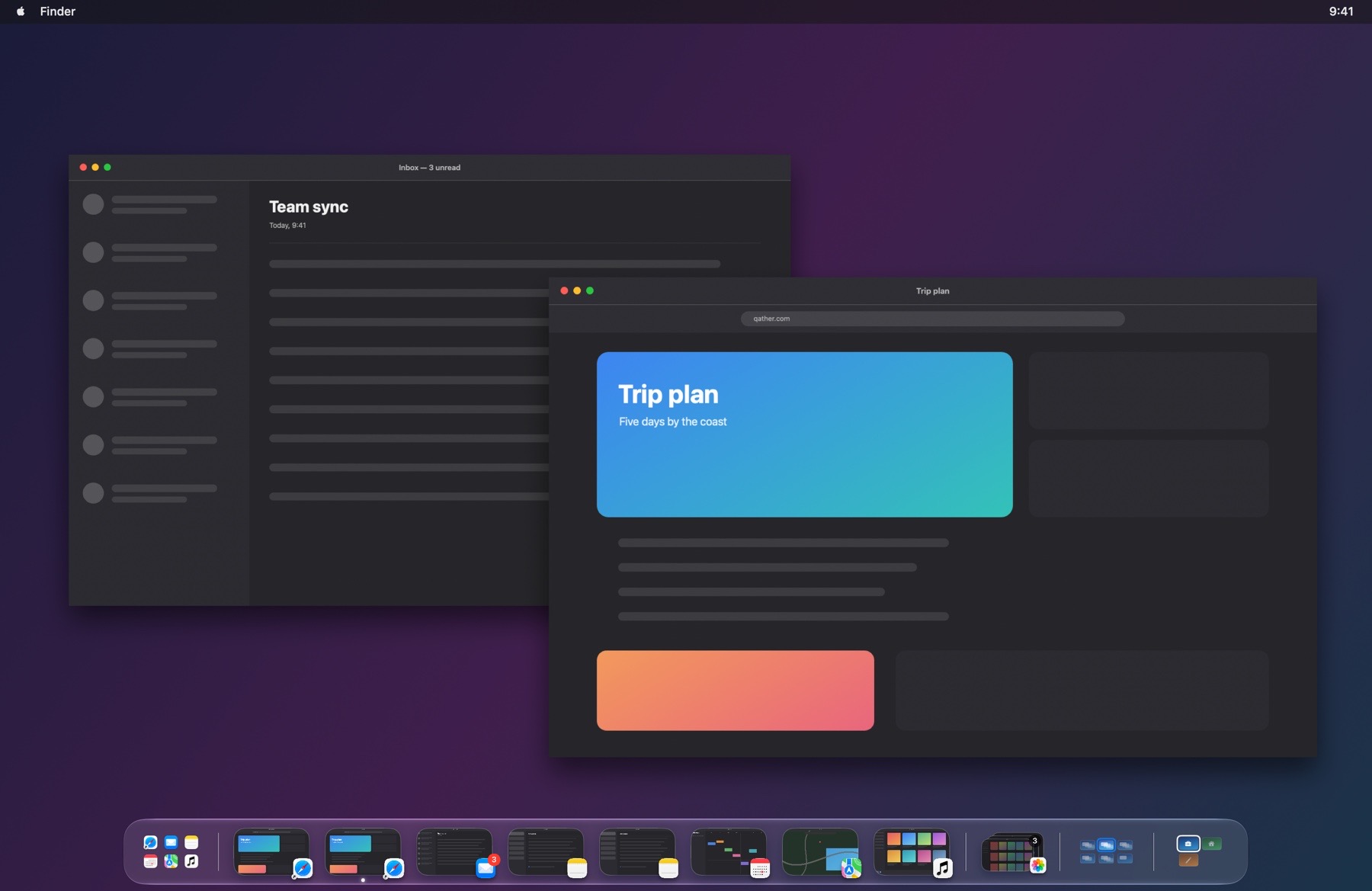
Qather brings back the thing Windows does well: one item for every open window. Its shelf sits at the bottom of the screen and shows each window of the space you're on, not one icon per app. Click a window to bring it forward, or right-click it to close, minimize, hide or quit it. Two windows of the same app get two items, so you can pick the one you want. The Dock moves to the left or goes out of sight while Qather runs, your choice.
Questions
Does Qather replace the Dock?
The Dock stays. At first launch you choose whether Qather moves it to the left or hides it. With it hidden, the launcher on the shelf is how you open apps. Quit Qather and the Dock returns as it was.
Does it show windows from other desktops?
The shelf covers the space you're on. Anything on another space or display is collected at the start of the shelf; click it to go there.